Best Monitor Arms with Keyboard Tray
Monitor arms with integrated keyboard trays combine ergonomic display positioning with convenient workspace organization. These hybrid solutions eliminate the need for separate monitor mounts and keyboard stands, creating a unified setup that saves desk space and reduces clutter. Perfect for professionals seeking streamlined workstations, these arms position your screen at optimal eye level while keeping your keyboard at the ideal typing height, promoting better posture and comfort during long work sessions.
Typical users include remote workers, content creators, and office professionals who spend extended hours at their desks. Whether you're managing multiple applications, editing videos, or handling data entry, having your monitor and keyboard ergonomically aligned reduces strain and fatigue. These setups work exceptionally well in compact home offices, corporate environments, and any workspace where maximizing comfort and minimizing footprint matter equally.
Key features to evaluate include weight capacity for your monitor size, keyboard tray adjustability, mounting type (desk clamp or grommet), swivel and tilt range, and construction material. Look for smooth articulation, cable management options, and trays with proper wrist support or anti-fatigue design. Premium models offer independent monitor and keyboard height adjustment, full-motion capabilities, and tool-free installation for maximum flexibility and convenience.
6 Top Monitor Arms with Keyboard Trays

The WALI GSMP001NLP is a 2-in-1 desk mount designed to support both a laptop up to 17 inches and a monitor up to 32 inch…
Read more ↓Show less ↑
The WALI GSMP001NLP is a 2-in-1 desk mount designed to support both a laptop up to 17 inches and a monitor up to 32 inches simultaneously. It accommodates VESA patterns 75x75mm and 100x100mm, with a combined weight capacity of up to 26.4 lbs for the monitor and 22 lbs for the laptop. The detachable laptop tray features ventilation holes to promote airflow and heat dissipation during extended use.
This mount offers comprehensive adjustability with -45° to +70° tilt, 180° swivel, and 360° rotation capabilities. The arm extends up to 19.3 inches and adjusts vertically up to 17.3 inches, allowing users to achieve optimal ergonomic positioning. Installation is flexible with both clamp and grommet mounting options suitable for desks between 0.39 and 2.76 inches thick.
- Mount Type
- Desk Clamp / Grommet
- Number of Monitors
- 1 + 1 Laptop
- Max Screen Size
- 32 in
- Weight Capacity
- 26.4 lbs
- VESA
- 75x75, 100x100
- Arm Movement
- Tilt, Swivel, Rotation

This triple-arm mount accommodates two monitors up to 32 inches and one laptop up to 17 inches on a single desk setup. T…
Read more ↓Show less ↑
This triple-arm mount accommodates two monitors up to 32 inches and one laptop up to 17 inches on a single desk setup. The dual monitor arms feature full articulation with ±45° tilt, ±90° swivel, and 360° rotation capabilities. A 20-inch pole provides flexible height adjustment up to 29.5 inches with maximum extension of 21 inches.
The mount offers both C-clamp and grommet mounting options for desks ranging from 1.6 to 3.15 inches thick. The laptop tray provides independent positioning with ±90° tilt, ±90° swivel, and full rotation. VESA compatibility includes 75x75mm and 100x100mm patterns, supporting up to 19.8 lbs per monitor arm and 17.6 lbs for the laptop.
- Mount Type
- Desk Clamp / Grommet
- Number of Monitors
- 2
- Max Screen Size
- 32 in
- Weight Capacity
- 19.8 lbs
- VESA
- 75x75, 100x100
- Arm Movement
- ±45° tilt, ±90° swivel, 360° rotation
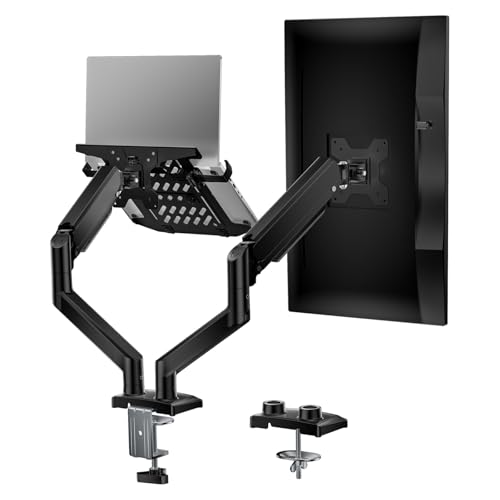
The WALI GSMP002LP is a dual-arm desk mount designed to support both a laptop and monitor simultaneously, eliminating th…
Read more ↓Show less ↑
The WALI GSMP002LP is a dual-arm desk mount designed to support both a laptop and monitor simultaneously, eliminating the need to switch between screens. The system features adjustable mounting plates compatible with VESA 75x75mm and 100x100mm standards, with each arm capable of supporting up to 19.8 lbs. The extended arms reach up to 19.9 inches in length and rise to 16 inches in height, offering comprehensive positioning flexibility.
This mount provides extensive adjustment options including ±90° tilt, 360° swivel, and full landscape-to-portrait rotation capability. The integrated laptop tray includes ventilation holes to prevent overheating and features a protective lip to secure devices during use. Installation is flexible with both C-clamp (fits 0.39-3.1 inches) and grommet base (fits 0.39-1.77 inches) options, completing setup in approximately 10 minutes.
- Mount Type
- Desk Clamp / Grommet Mount
- Number of Monitors
- 2
- Max Screen Size
- 32 in
- Weight Capacity
- 19.8 lbs
- VESA
- 75x75, 100x100
- Arm Movement
- Tilt ±90°, Swivel 360°, Rotate 360°

This dual monitor arm with integrated laptop tray combines two display mounts into one space-saving solution. It support…
Read more ↓Show less ↑
This dual monitor arm with integrated laptop tray combines two display mounts into one space-saving solution. It supports monitors up to 32 inches and laptops from 10.1 to 17.3 inches, making it ideal for multi-tasking professionals who need both large displays and notebook access simultaneously.
Features gas spring technology for smooth, effortless one-hand adjustments with full range of motion including tilt, swivel, and height adjustment. The universal VESA mounting accommodates most standard displays, while the lockable laptop clips allow precise vertical and horizontal positioning to keep all ports accessible.
- Mount Type
- Desk Clamp
- Number of Monitors
- 2
- Max Screen Size
- 32 in
- Weight Capacity
- 19.84 lbs
- VESA
- 100x100mm / 75x75mm
- Arm Movement
- —

This 2-in-1 mount accommodates both laptops up to 17 inches and monitors up to 32 inches with VESA 75x75mm and 100x100mm…
Read more ↓Show less ↑
This 2-in-1 mount accommodates both laptops up to 17 inches and monitors up to 32 inches with VESA 75x75mm and 100x100mm compatibility. The removable laptop tray features adjustable side clamps and ventilation slots for heat dissipation. Supports devices weighing 4.4 to 22 lbs with a gas spring arm that extends up to 20.9 inches forward and 23.6 inches in height.
Full motion adjustment includes 180-degree swivel, 360-degree rotation, and tilt from +70 to -45 degrees. Installation options include C-clamp for desks 0.39-2.76 inches thick or grommet mount for 0.39-1.97 inch desks. Built-in cable management system helps organize workspace while freeing up desk surface area.
- Mount Type
- Desk Clamp / Grommet
- Number of Monitors
- 1
- Max Screen Size
- 32 in
- Weight Capacity
- 22 lbs
- VESA
- 75x75, 100x100
- Arm Movement
- Swivel, Tilt, Rotation

The Ergotron StyleView is a sit-stand combo system designed for active workspace management. It combines a monitor arm w…
Read more ↓Show less ↑
The Ergotron StyleView is a sit-stand combo system designed for active workspace management. It combines a monitor arm with an integrated worksurface, allowing users to transition between sitting and standing positions with a 25-inch single-motion lift adjustment. The system accommodates multiple peripherals including a monitor, keyboard, mouse, wrist rest, and barcode scanner on a single unified arm.
Constructed from durable polished aluminum, this system features open-architecture design that scales for future equipment additions. An integrated cable management system conceals and organizes cords for a cleaner workspace and easier maintenance. The ergonomic design supports comfortable data entry work across different postures and working heights.
- Mount Type
- Sit-Stand Combo System
- Number of Monitors
- 1
- Max Screen Size
- — in
- Weight Capacity
- — lbs
- VESA
- —
- Arm Movement
- Vertical lift adjustment
How to Choose a Monitor Arm with Keyboard Tray
Start by assessing your monitor's weight and size to ensure the arm's weight capacity is adequate. Consider your desk type—solid desks work with clamp mounts, while desks with grommets or thin surfaces may require grommet mounts. Measure your available desk space and ensure the arm's extension and reach will comfortably position both monitor and keyboard within your natural working distance without awkward stretching.
Evaluate the keyboard tray's adjustment range and comfort features carefully. The tray should move smoothly in multiple directions and lock securely at your preferred height and angle. Look for ergonomic design elements like wrist rests, anti-fatigue padding, and slope adjustment. Test whether you can achieve your ideal typing position, as an adjustable tray means nothing if it doesn't support your unique biomechanics.
Finally, consider mounting flexibility and build quality. Premium materials like aluminum offer durability and lighter weight, reducing strain on your desk. Check for smooth articulation joints, intuitive controls, and hassle-free installation. Read user reviews focusing on long-term stability and how the arm performs under daily stress. Warranty coverage provides peace of mind for this investment in your workspace ergonomics.
Best Monitor Arms with Keyboard Tray Prices
Monitor arms with keyboard trays range from budget-friendly options starting around $100 to premium ergonomic systems exceeding $400, depending on weight capacity, adjustment range, and material quality.
| Price Tier | Price |
|---|---|
| Budget (lowest) | $38 |
| Average price | $236 |
| Premium (highest) | $1,076 |