Best Monitor Arms for Video Editing
Video editing demands precision, comfort, and optimal screen real estate. Monitor arms designed for video editing prioritize smooth adjustability, sturdy construction, and compatibility with multiple displays. These specialized mounts free up desk space while allowing editors to position screens at ideal angles for color-critical work, reducing neck strain during long editing sessions and enabling side-by-side reference monitoring.
Video editing professionals typically work with dual or triple monitor setups to compare footage, timelines, and color grading simultaneously. The best editing monitor arms support heavy professional displays while maintaining rock-solid stability—essential when making precise color corrections or detailed frame-by-frame adjustments. Quality construction prevents unwanted drift or vibration that could compromise accuracy.
Key features for video editing include 360-degree rotation, height adjustment, tilt and swivel capabilities, cable management systems, and VESA compatibility with larger displays. Look for arms with high weight capacity, smooth adjustment mechanisms, and finishes that don't interfere with color-critical work. Professional-grade articulation ensures your expensive displays stay perfectly positioned throughout demanding editing workflows.
13 Best Monitor Arms for Video Editing

The BenQ BSH01 is a single monitor arm designed for displays up to 45 inches and 44 lbs. It features a gas spring mechan…
Read more ↓Show less ↑
The BenQ BSH01 is a single monitor arm designed for displays up to 45 inches and 44 lbs. It features a gas spring mechanism tested for 25,000 cycles to ensure consistent support without sagging. The arm offers full motion adjustability with an extension up to 22.4 inches, tilt range of +50° to -20°, 180° swivel, and 360° rotation. Height adjustment ranges from 8.7 to 18.7 inches.
Installation is straightforward with either a top-mounting C clamp or grommet base option. The included reinforcement plate protects desks from scratches and deformation. Built-in cable management keeps wiring organized and out of sight. Compatible with VESA 75x75mm and 100x100mm patterns, the arm works with most major monitor brands.
- Mount Type
- Desk Clamp / Grommet
- Number of Monitors
- 1
- Max Screen Size
- 45 in
- Weight Capacity
- 44 lbs
- VESA
- 75x75, 100x100
- Arm Movement
- Full Motion

The BenQ BDH01 is a dual monitor arm designed to support two displays up to 35 inches each, with a combined weight capac…
Read more ↓Show less ↑
The BenQ BDH01 is a dual monitor arm designed to support two displays up to 35 inches each, with a combined weight capacity of 44 lbs per monitor. It features gas spring technology tested for 25,000 cycles, ensuring consistent support without sagging. The arm accommodates VESA patterns of 75x75mm and 100x100mm, making it compatible with most modern monitors from major brands including Dell, HP, Samsung, LG, and ASUS.
Installation is straightforward with both top clamp and grommet mounting options, plus a steel reinforcement plate to protect fragile surfaces. The arm offers extensive adjustability with extension up to 19 inches, tilt from +50° to -20°, 180° swivel, and full 360° rotation. Height adjustment ranges from 8.7 to 18.7 inches, and integrated cable management helps maintain a clean workspace.
- Mount Type
- Dual Monitor Arm with Clamp and Grommet Base
- Number of Monitors
- 2
- Max Screen Size
- 35 in
- Weight Capacity
- 44 lbs
- VESA
- 75x75, 100x100
- Arm Movement
- 19" extension, +50° to -20° tilt, 180° swivel, 360° rotation, 8.7-18.7" height adjustment

The BenQ BSH02 is a full-motion monitor arm designed for single displays up to 45 inches and 44 pounds. It features a ga…
Read more ↓Show less ↑
The BenQ BSH02 is a full-motion monitor arm designed for single displays up to 45 inches and 44 pounds. It features a gas spring mechanism tested for 25,000 cycles to prevent sagging and ensure consistent support. The arm accommodates both 75x75mm and 100x100mm VESA patterns, making it compatible with most modern monitors from major brands.
Installation is straightforward with your choice of top clamp or grommet base mounting options. A steel reinforcement plate protects desks from damage and scratches. The arm offers extensive adjustability including 22.4 inches of extension, ±50° to -20° tilt, 180° swivel, 360° rotation, and 8.7 to 18.7 inches of height adjustment. Built-in cable management helps maintain a clean workspace.
- Mount Type
- Full Motion Monitor Arm with Clamp/Grommet
- Number of Monitors
- 1
- Max Screen Size
- 45 in
- Weight Capacity
- 44 lbs
- VESA
- 75x75, 100x100
- Arm Movement
- Extension 22.4", Tilt +50° to -20°, Swivel 180°, Rotation 360°, Height 8.7"-18.7"

Premium single monitor arm designed for large displays up to 49 inches and weights between 20-42 lbs. Features full moti…
Read more ↓Show less ↑
Premium single monitor arm designed for large displays up to 49 inches and weights between 20-42 lbs. Features full motion capability with 11.5 inches of vertical lift and 360-degree rotation, allowing screens to rise 17.8 inches above the desktop. Includes both desk clamp and grommet mounting options for flexible installation on surfaces with edge thickness from 0.4 to 2.6 inches.
Supports multiple VESA patterns including 75x75mm, 100x100mm, 200x100mm, and 200x200mm, with adapter kits available for larger patterns. Heavy-duty construction includes cable management and low-profile design for tight spaces. Backed by a 10-year warranty and Ergotron's technical support.
- Mount Type
- Desk Clamp / Grommet
- Number of Monitors
- 1
- Max Screen Size
- 49 in
- Weight Capacity
- 42 lbs
- VESA
- 75x75, 100x100, 200x100, 200x200
- Arm Movement
- 360° rotation, 75° tilt, 11.5" lift
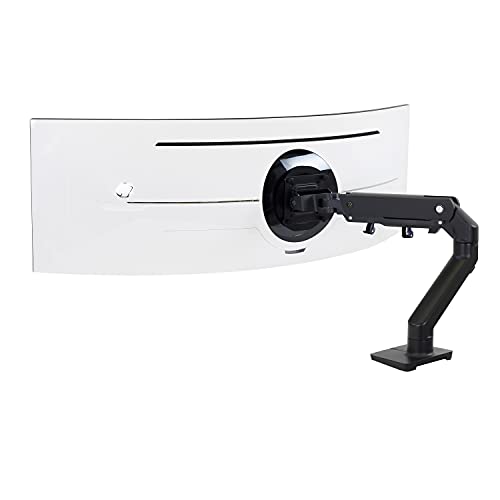
Single monitor desk mount designed for large curved ultrawide displays up to 49 inches and weighing 28 to 42 pounds. Fea…
Read more ↓Show less ↑
Single monitor desk mount designed for large curved ultrawide displays up to 49 inches and weighing 28 to 42 pounds. Features full range of motion with 11.5 inches of lift, allowing screens to rise 17.8 inches from the work surface. Includes 360-degree rotation and 20-degree tilt adjustment for customizable positioning. Compatible with VESA patterns 75x75mm and 100x100mm.
Comes with desk clamp mount for surface edges 0.4 to 2.6 inches thick and grommet mount for installation through desk holes. Built with extensive quality testing to ensure stability and security. Backed by a 10-year warranty and expert technical support from Ergotron.
- Mount Type
- Desk Clamp / Grommet Mount
- Number of Monitors
- 1
- Max Screen Size
- 49 in
- Weight Capacity
- 42 lbs
- VESA
- 75x75mm, 100x100mm
- Arm Movement
- 360° rotation, 20° tilt, 11.5" lift
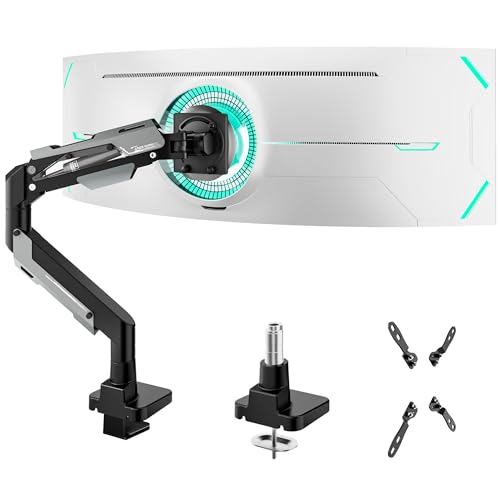
Single monitor arm designed for ultrawide and large displays up to 57 inches. Features premium aluminum and steel constr…
Read more ↓Show less ↑
Single monitor arm designed for ultrawide and large displays up to 57 inches. Features premium aluminum and steel construction with a gas spring system tested for 20,000 cycles, providing smooth height adjustment and stability. Supports up to 66 lbs for flat screens and 52.8 lbs for curved displays. Compatible with multiple VESA patterns including 75x75, 100x100, 100x200, 200x100, and 200x200 mm.
Offers extensive adjustability with 70° tilt up, 45° tilt down, ±90° swivel, and 360° rotation capabilities. Includes dual mounting options: C-clamp for desktops 0.47-1.77 inches thick and grommet mount. Built-in cable management keeps wires organized. Quick installation with instruction manual and online video guide provided.
- Mount Type
- Desk Clamp / Grommet
- Number of Monitors
- 1
- Max Screen Size
- 57 in
- Weight Capacity
- 66 lbs
- VESA
- 75x75, 100x100, 100x200, 200x100, 200x200
- Arm Movement
- 70° tilt up, 45° tilt down, ±90° swivel, 360° rotation, 22.4" height adjustment

The HUANUO TitanLift is a heavy-duty single monitor arm constructed from high-strength aluminum alloy, designed to suppo…
Read more ↓Show less ↑
The HUANUO TitanLift is a heavy-duty single monitor arm constructed from high-strength aluminum alloy, designed to support ultrawide screens up to 49 inches. It accommodates monitors weighing between 6.6 and 44 lbs with VESA mounting patterns of 75x75mm or 100x100mm. The arm has been rigorously tested with 50,000 cycle motion tests and 3X load testing to ensure long-term stability and durability.
This mount offers extensive adjustment capabilities, including tilt from +50° to -50°, 180° swivel, 360° rotation on compatible screens up to 35 inches, and extension up to 22.5 inches. Height adjustment reaches 19.6 inches from the desk surface. Installation is straightforward with a quick 3-step setup and tool-free tension adjustment. The mount uses a dual C-clamp system and requires a wooden desk between 0.8 and 3.5 inches thick with no cross beams.
- Mount Type
- Desk Clamp
- Number of Monitors
- 1
- Max Screen Size
- 49 in
- Weight Capacity
- 44 lbs
- VESA
- 75x75, 100x100
- Arm Movement
- Tilt ±50°, Swivel 180°, Rotate 360°, Extend 22.5", Height 19.6"

The VIVO STAND-V002O is a dual monitor stand designed to support two displays from 17 to 32 inches. It features mechanic…
Read more ↓Show less ↑
The VIVO STAND-V002O is a dual monitor stand designed to support two displays from 17 to 32 inches. It features mechanical spring arms with toolless adjustment, allowing for precise counterbalance in all directions. The stand accommodates monitors weighing up to 19.8 lbs each with VESA 75x75mm or 100x100mm mounting patterns, making it compatible with most modern flat and curved displays.
This stand offers extensive articulation with +90° to -90° tilt, 180° swivel, and 360° rotation per arm for customizable viewing angles. It mounts via heavy-duty C-clamp (fitting desks up to 3.1 inches thick) or optional bolt-through grommet mount (up to 1.9 inches). The open-top VESA plates enable quick slide-on monitor installation without additional tools, making setup straightforward for gaming and office environments.
- Mount Type
- Desk Clamp / Grommet Mount
- Number of Monitors
- 2
- Max Screen Size
- 32 in
- Weight Capacity
- 19.8 lbs
- VESA
- 75x75, 100x100
- Arm Movement
- Tilt ±90°, Swivel 180°, Rotation 360°

A heavy-duty single monitor arm designed for ultrawide and large curved displays up to 49 inches and 44 lbs. Features a…
Read more ↓Show less ↑
A heavy-duty single monitor arm designed for ultrawide and large curved displays up to 49 inches and 44 lbs. Features a precision gas spring mechanism for smooth, effortless one-hand adjustment with extensive range of motion. Compatible with 75x75mm and 100x100mm VESA mounts, making it suitable for most modern gaming and professional displays.
Installs via C-clamp or optional grommet mount to desks up to 2.17 inches thick. The arm supports full articulation including swivel, tilt from -90 to 15 degrees, and extension up to 24.5 inches. Backed by durability testing of 20,000 cycles and a 5-year manufacturer support warranty.
- Mount Type
- Single Arm (C-clamp/Grommet)
- Number of Monitors
- 1
- Max Screen Size
- 49 in
- Weight Capacity
- 44 lbs
- VESA
- 75x75, 100x100
- Arm Movement
- Swivel, Tilt (-90 to 15°), Extension (24.5")
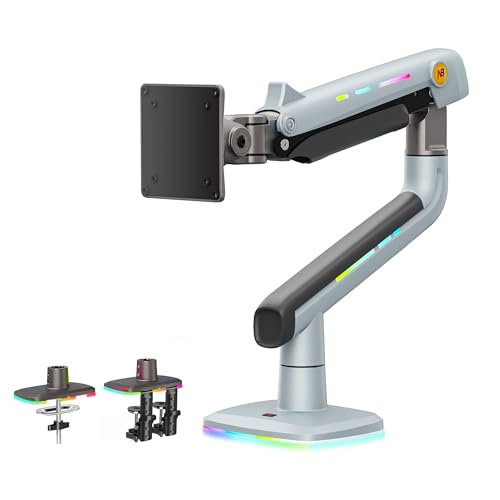
Single monitor arm designed for large displays between 32 and 60 inches, supporting up to 20 kg. Features dual installat…
Read more ↓Show less ↑
Single monitor arm designed for large displays between 32 and 60 inches, supporting up to 20 kg. Features dual installation options with C-clamp or grommet mounting for flexible desk integration. Built-in RGB lighting with one-click color mode switching provides customizable ambient lighting without additional purchases.
Offers comprehensive ergonomic adjustments including 360-degree rotation, -50 to +50 degree tilt, -90 to +90 degree swivel, and up to 25 inches of arm extension. Constructed from premium aluminum with mechanical ProSpring tension adjustment and integrated cable management. Advanced locking system has passed 50,000 performance cycles and 3X overload stress testing.
- Mount Type
- Desk Clamp / Grommet Mount
- Number of Monitors
- 1
- Max Screen Size
- 60 in
- Weight Capacity
- 44 lbs
- VESA
- 75x75, 100x100
- Arm Movement
- 360° rotation, -50° to +50° tilt, -90° to +90° swivel, 25" extension

Triple monitor mount designed for ultrawide setups with flexible configuration options. The center arm accommodates disp…
Read more ↓Show less ↑
Triple monitor mount designed for ultrawide setups with flexible configuration options. The center arm accommodates displays up to 49 inches, while two side arms support up to 35-inch monitors. Built from cast aluminum with a weight capacity of 44 lbs total, this mount supports VESA patterns of 75x75mm and 100x100mm. Installation includes both C-clamp and grommet base options for various desk types.
Features comprehensive adjustability with ±35° tilt, ±90° swivel, and 360° rotation on all arms. The center screen includes height adjustment, while side arms offer smooth gas spring movement for dynamic positioning. Integrated cable management keeps workspace organized, and the reinforced construction provides long-term stability for heavy displays.
- Mount Type
- Desk Clamp / Grommet
- Number of Monitors
- 3
- Max Screen Size
- 49 in
- Weight Capacity
- 44 lbs
- VESA
- 75x75, 100x100
- Arm Movement
- Tilt ±35°, Swivel ±90°, Rotate 360°

The MSI MAG MT201 is a heavy-duty single monitor stand arm designed to support screens ranging from 17 to 49 inches with…
Read more ↓Show less ↑
The MSI MAG MT201 is a heavy-duty single monitor stand arm designed to support screens ranging from 17 to 49 inches with a maximum weight capacity of 44 lbs. It features VESA compatibility (75x75, 100x100 mm) and includes both clamp and grommet mounting options, accommodating desk thicknesses from 10-85 mm for clamp or 10-35 mm for grommet installation.
This monitor arm offers comprehensive adjustability with tilt, swivel, and rotation capabilities to optimize viewing angles and ergonomic comfort. The quick-release VESA plate enables hassle-free mounting and dismounting, making it easy to reconfigure your workspace setup as needed.
- Mount Type
- Clamp & Grommet
- Number of Monitors
- 1
- Max Screen Size
- 49 in
- Weight Capacity
- 44 lbs
- VESA
- 75x75, 100x100
- Arm Movement
- Tilt, Swivel, Rotation

The ASUS ROG Ergo AAS01 is a single monitor arm designed for displays up to 39 inches and weighing up to 23.35 pounds. I…
Read more ↓Show less ↑
The ASUS ROG Ergo AAS01 is a single monitor arm designed for displays up to 39 inches and weighing up to 23.35 pounds. It features a mechanical spring system that enables full-range height, tilt, and swivel adjustments for ergonomic positioning. The arm uses VESA 100x100mm mounting and includes integrated cable management to maintain a clean desk setup.
Built for durability and reliability, this monitor mount underwent rigorous testing including a 10,000-cycle range of motion test during development. The quick installation process makes setup straightforward, while the adjustable spring tension accommodates various monitor weights for balanced, stable support throughout the day.
- Mount Type
- Monitor Arm
- Number of Monitors
- 1
- Max Screen Size
- 39 in
- Weight Capacity
- 23.35 lbs
- VESA
- 100x100
- Arm Movement
- Height, Tilt, Swivel
How to Choose a Monitor Arm for Video Editing
Consider your monitor count and combined weight before selecting an arm. Video editors often use dual setups with 27-32 inch displays, requiring single dual-monitor arms or multiple articulating arms. Check VESA compatibility and weight ratings carefully—professional displays are heavier than standard monitors. Ensure the arm's reach extends across your desk without tipping, and verify it accommodates your specific monitor sizes and weight distribution.
Prioritize smooth, precise adjustment mechanisms that won't slip or require constant readjustment. Ball-bearing articulation and gas spring technology provide fluid motion without drift. Test the adjustment resistance—it should hold position firmly during work sessions. Cable management becomes critical with dual displays; look for integrated routing channels that keep cables organized and away from your workspace without creating tension on the arm.
Evaluate mounting options based on your desk setup. Desk clamp mounts offer stability and flexibility for non-permanent installation, while grommet mounts work well for smaller desks. Consider monitor arm height range and desk clearance needs. Professional video editors benefit from arms offering extensive customization—choose models with quick-release plates, tool-free adjustments, and adaptable configurations that grow with your editing suite.
Best Monitor Arms for Video Editing Prices
Video editing monitor arms range from $150 to $600+ depending on load capacity, build quality, and number of displays supported. Professional-grade dual monitor arms with premium articulation typically cost $300-500, while single monitor arms start lower and heavy-duty multi-display solutions command premium pricing.
| Price Tier | Price |
|---|---|
| Budget (lowest) | $50 |
| Average price | $168 |
| Premium (highest) | $367 |